Custom Dictionary

Custom Dictionary change

If you load Microsoft Word. (The Custom Dictionary will change for all)

Then select file and then “options” from the left hand pop out pane

A screen shot of a computer

AI-generated content may be incorrect.


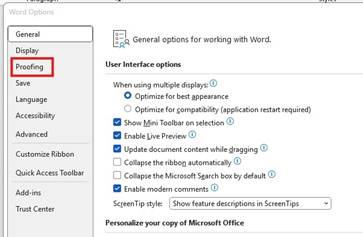
When options windows loads, select proofing
A screenshot of a computer

AI-generated content may be incorrect.


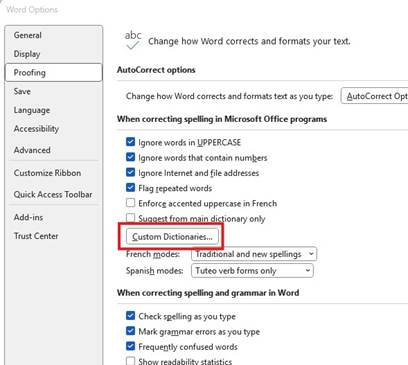
Under proofing you can select Custom Dictionaries
A screenshot of a computer

AI-generated content may be incorrect.


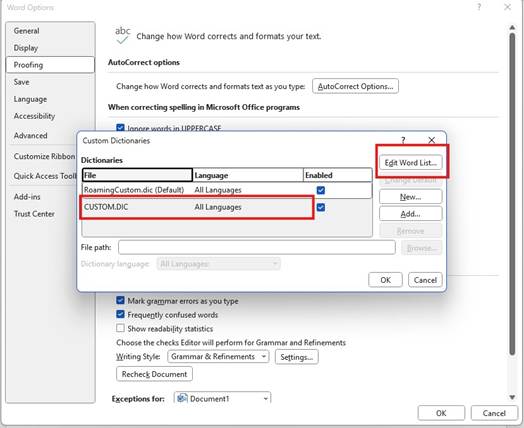
Within Custom Dictionaries select the CUSTOM.DIC and then select edit word list.
A screenshot of a computer

AI-generated content may be incorrect.


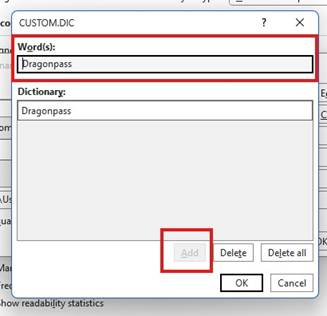
In the pop out add “Dragonpass”

A screenshot of a computer

AI-generated content may be incorrect.


Revision #1
Created 24 July 2025 10:43:33 by Chris
Updated 24 July 2025 10:44:26 by Chris