# Office365 How To Forward using OWA Outlook O365

<div id="bkmrk-"></div>Log into [**office.com**](https://office.com) using your email and password.

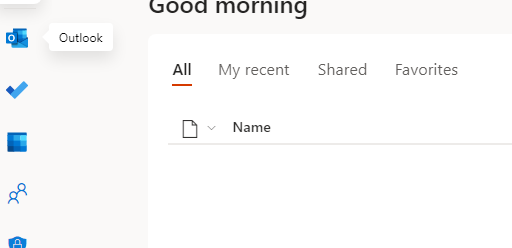
Open **Outlook** on the left:

[![image-1625222628245.PNG](https://wiki.safetynet-it.com/uploads/images/gallery/2021-07/scaled-1680-/5b9VMDmfFE3puByM-image-1625222628245.PNG)](https://wiki.safetynet-it.com/uploads/images/gallery/2021-07/5b9VMDmfFE3puByM-image-1625222628245.PNG)
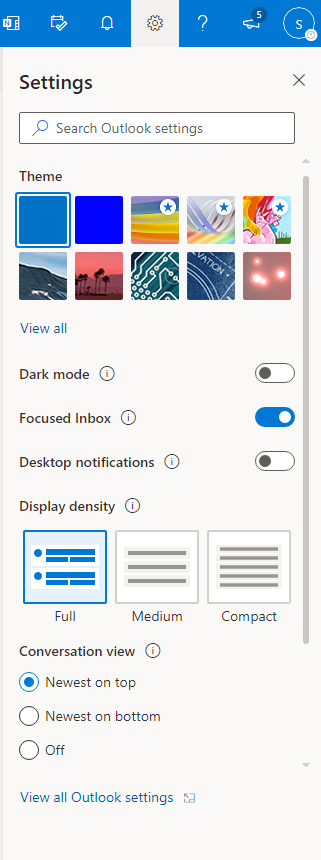
Click the **Cog** symbol in the top right and select **Settings**:

[![image-1625222638802.PNG](https://wiki.safetynet-it.com/uploads/images/gallery/2021-07/scaled-1680-/w84LB9VEnSjD6OaK-image-1625222638802.PNG)](https://wiki.safetynet-it.com/uploads/images/gallery/2021-07/w84LB9VEnSjD6OaK-image-1625222638802.PNG)
On the left click **Forwarding** and set up the forward.

Check keep a copy if you wish to receive a copy and forward the email.

<div id="bkmrk-%C2%A0-5"><div><svg class="svg-icon" data-icon="link" role="presentation" viewbox="0 0 24 24" xmlns="http://www.w3.org/2000/svg"></svg><div> <button class="button outline icon" data-clipboard-target="#pointer-url" title="Copy Link" type="button"><svg class="svg-icon" data-icon="copy" role="presentation" viewbox="0 0 24 24" xmlns="http://www.w3.org/2000/svg"></svg></button></div>[<svg class="svg-icon" data-icon="edit" role="presentation" viewbox="0 0 24 24" xmlns="http://www.w3.org/2000/svg"></svg>](https://wiki.safetynet-it.com/books/office-apps/page/office365-how-to-forward-using-owa-outlook-o365/edit?content-id=bkmrk--1&content-text= "Edit Content")</div></div>[![image-1625222655497.PNG](https://wiki.safetynet-it.com/uploads/images/gallery/2021-07/scaled-1680-/TKzjVIQQT3PKiJ3y-image-1625222655497.PNG)](https://wiki.safetynet-it.com/uploads/images/gallery/2021-07/TKzjVIQQT3PKiJ3y-image-1625222655497.PNG)