# Logging into a company device + Setup Guides

## Logging in to Your Company Device

You need to know your company **Microsoft account, email** and **password**   
This account is used to log in to both your **company laptop or desktop** and your **Office.com** account (for email, documents, Teams, etc.).

<p class="callout info">If you are not aware of this please contact **HR** or **raise at ticket to our helpdesk** [(how to contact us)](https://wiki.safetynet-it.com/books/safetynet-it/page/contact-the-helpdesk)</p>

---

### Logging in for the First Time

1. **Turn on the device.**
2. On the login screen, choose **“Other User”**.
    
    [![image.png](https://wiki.safetynet-it.com/uploads/images/gallery/2025-10/scaled-1680-/5CLVLkqBtGK9BwAk-image.png)](https://wiki.safetynet-it.com/uploads/images/gallery/2025-10/5CLVLkqBtGK9BwAk-image.png)
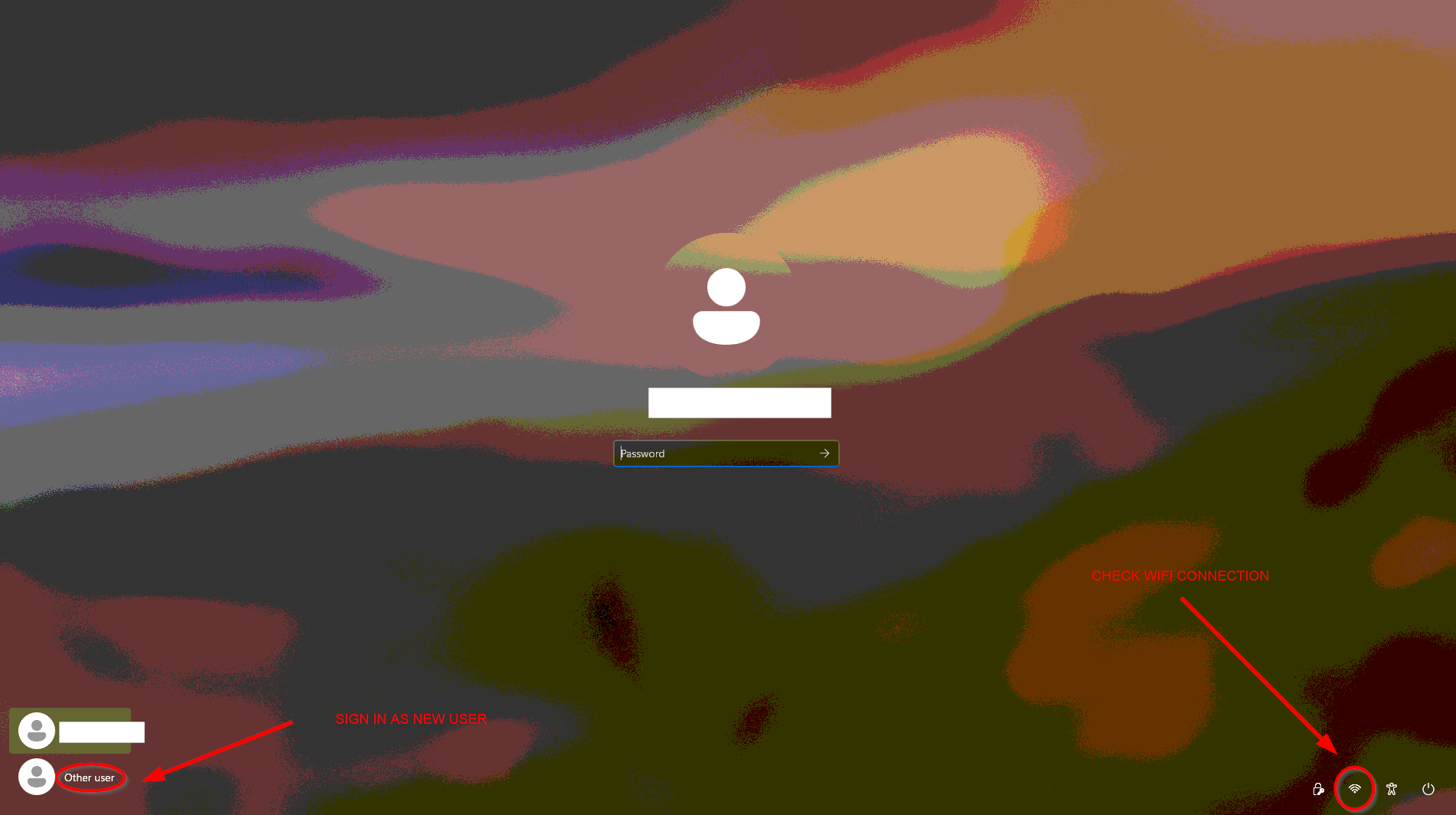
3. Enter your **company email address** and **password**.
    
    
    - Example: `<a href="mailto:firstname.lastname@prosperitychildrensservices.com">firstname.lastname@prosperitychildrensservices.com</a>` and your **password.**
4. Once complete, you will arrive at your desktop and you are ready to go.

<p class="callout warning">**Issues?**  
  
**Check you are connected to Wi-Fi or plugged into ethernet**  
see our [Wi-Fi connection guide](https://wiki.safetynet-it.com/books/windows-8ma/page/how-to-connect-to-wi-fi-from-the-logon-screen)  
  
**Multi-Factor Authentication (MFA)?**   
Follow the on-screen steps or see our [MFA setup guide](https://wiki.safetynet-it.com/books/office365/page/multi-factor-authentication-setup-user-guide)  
  
**<span data-end="1073" data-start="1046">Do not </span>see “Other User”**, the device may not yet be registered.  
Please [**raise a ticket with IT** ](https://wiki.safetynet-it.com/books/safetynet-it/page/contact-the-helpdesk)for assistance.</p>

---

### After Logging In

Here are some common next steps once you’ve signed in:

- **Access your OneDrive files** to view or sync documents stored in the cloud.  
    → [Set up OneDrive<span aria-hidden="true" class="ms-0.5 inline-block align-middle leading-none"><svg class="block h-[0.75em] w-[0.75em] stroke-current stroke-[0.75]" data-rtl-flip="" fill="currentColor" height="20" viewbox="0 0 20 20" width="20" xmlns="http://www.w3.org/2000/svg"><path d="M14.3349 13.3301V6.60645L5.47065 15.4707C5.21095 15.7304 4.78895 15.7304 4.52925 15.4707C4.26955 15.211 4.26955 14.789 4.52925 14.5293L13.3935 5.66504H6.66011C6.29284 5.66504 5.99507 5.36727 5.99507 5C5.99507 4.63273 6.29284 4.33496 6.66011 4.33496H14.9999L15.1337 4.34863C15.4369 4.41057 15.665 4.67857 15.665 5V13.3301C15.6649 13.6973 15.3672 13.9951 14.9999 13.9951C14.6327 13.9951 14.335 13.6973 14.3349 13.3301Z"></path></svg></span>](https://wiki.safetynet-it.com/books/office365/page/sign-into-onedrive)
- **Open Office apps** such as Outlook, Word, or Teams using your company account.  
    → [Sign in to Office apps<span aria-hidden="true" class="ms-0.5 inline-block align-middle leading-none"><svg class="block h-[0.75em] w-[0.75em] stroke-current stroke-[0.75]" data-rtl-flip="" fill="currentColor" height="20" viewbox="0 0 20 20" width="20" xmlns="http://www.w3.org/2000/svg"><path d="M14.3349 13.3301V6.60645L5.47065 15.4707C5.21095 15.7304 4.78895 15.7304 4.52925 15.4707C4.26955 15.211 4.26955 14.789 4.52925 14.5293L13.3935 5.66504H6.66011C6.29284 5.66504 5.99507 5.36727 5.99507 5C5.99507 4.63273 6.29284 4.33496 6.66011 4.33496H14.9999L15.1337 4.34863C15.4369 4.41057 15.665 4.67857 15.665 5V13.3301C15.6649 13.6973 15.3672 13.9951 14.9999 13.9951C14.6327 13.9951 14.335 13.6973 14.3349 13.3301Z"></path></svg></span>](https://wiki.safetynet-it.com/books/office365/page/opening-and-logging-into-office-apps-desktop)
- **Access shared files or team folders** through SharePoint.  
    → [Sync SharePoint sites<span aria-hidden="true" class="ms-0.5 inline-block align-middle leading-none"><svg class="block h-[0.75em] w-[0.75em] stroke-current stroke-[0.75]" data-rtl-flip="" fill="currentColor" height="20" viewbox="0 0 20 20" width="20" xmlns="http://www.w3.org/2000/svg"><path d="M14.3349 13.3301V6.60645L5.47065 15.4707C5.21095 15.7304 4.78895 15.7304 4.52925 15.4707C4.26955 15.211 4.26955 14.789 4.52925 14.5293L13.3935 5.66504H6.66011C6.29284 5.66504 5.99507 5.36727 5.99507 5C5.99507 4.63273 6.29284 4.33496 6.66011 4.33496H14.9999L15.1337 4.34863C15.4369 4.41057 15.665 4.67857 15.665 5V13.3301C15.6649 13.6973 15.3672 13.9951 14.9999 13.9951C14.6327 13.9951 14.335 13.6973 14.3349 13.3301Z"></path></svg></span>](https://wiki.safetynet-it.com/books/office365/page/how-to-sync-a-sharepoint-online-document-library-to-a-local-machine)

---

### Need Help?

If you experience any issues signing in or accessing your files, please [**raise a support ticket**](https://wiki.safetynet-it.com/books/safetynet-it/page/contact-the-helpdesk) with us.  
Include as much detail as possible (device type, any error messages, and what you were trying to do).