**Last Updated: 26/11/2024**
## **TitanHQ Products: SpamTitan + PhishTitan** ### **How it works** **TitanHQ** offers advanced email security products designed to identify and block attacks, protecting your organization from various threats. **SpamTitan** is a robust email filtering solution that blocks threats and junk mail, and quarantines viruses before they reach user mailboxes. It provides comprehensive protection against spam, malware, and other email-borne threats, ensuring secure and efficient communication within your organization. ### **SpamTitan: User Guide** **SpamTitan** helps keep your inbox clean by blocking threats and junk mail. It sends you daily email digests so you can safely review and release any blocked emails. ##### **How It Works** - **Daily Spam Digest:** You'll receive an email each day listing any messages that were blocked. This digest lets you easily manage these emails without cluttering your inbox. - **Convenient Management:** The digest combines junk emails into one message, allowing you to handle them directly from the digest. [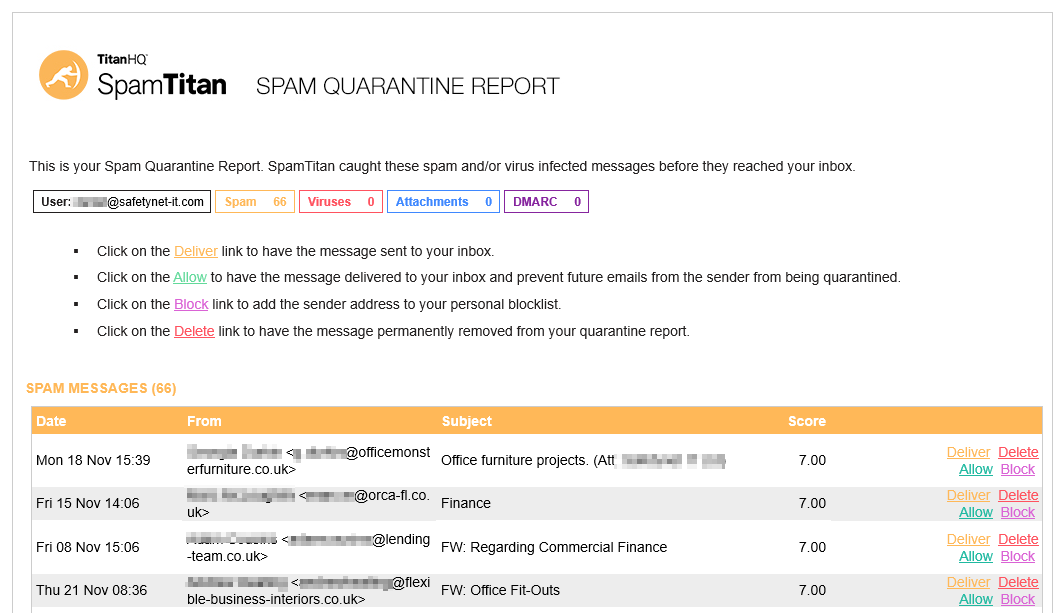](https://wiki.safetynet-it.com/uploads/images/gallery/2024-11/UJvymzKv7281QJ61-image-1732616399779.png) ##### **Releasing Emails** - **Deliver:** To immediately receive a blocked email, click **Deliver** next to the message in the digest. - **Allow:** Click **Allow** to whitelist the sender, ensuring their emails reach your inbox in the future. ##### **Blocking Emails** - **Block:** If you recognize a sender as malicious or consistently sending junk, click **Block** to prevent future emails from them. - **Delete:** Click **Delete** to remove a message from the quarantine so it won't appear in future digests. **Note:** Messages are automatically deleted from the digest after 25 days. ##### **Managing the digest** You can customize how often you receive the digest and adjust its settings: - **View Quarantine Online:** Access your quarantined emails through the online portal for more options. - **Request New Digest:** If needed, you can request an updated digest immediately. - **Adjust Settings:** Use the options at the end of the digest email to change frequency and notification preferences. [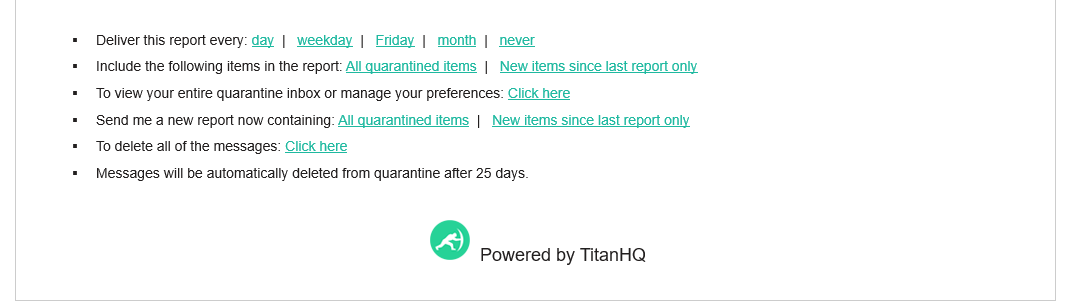](https://wiki.safetynet-it.com/uploads/images/gallery/2024-11/lxDeBE4k2d8dvgDu-image-1732616773037.png) ### **Support** #### For any support requests using the service please raise a support ticket to **