Windows
- How to Find the Computer or Host Name
- How to find the Computer Name at the Login Screen
- How to connect to Wi-Fi (from the logon screen)
How to Find the Computer or Host Name
How to find the Computer Name at the Login Screen
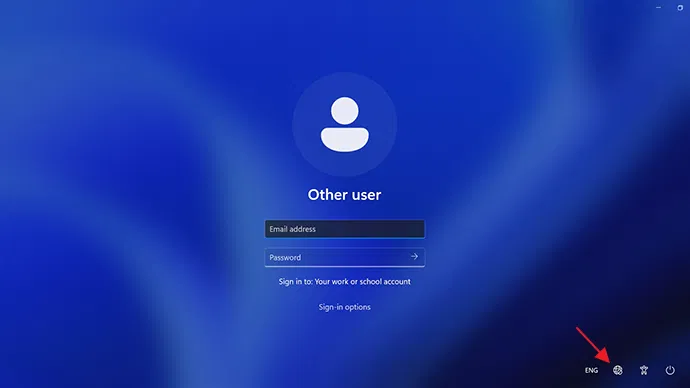
- At the login screen, click the option for 'Other User'
- Type
.\in the username field. - you will see your computers name show up under the password field;
CAS-WKTST-7X64in this image: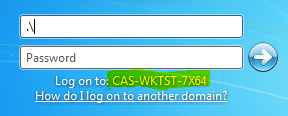
How to connect to Wi-Fi (from the logon screen)
-
On the login/lock screen, click the Wi-Fi / network icon (usually bottom right).
-
Choose your Wi-Fi network from the list.
-
If prompted, enter the Wi-Fi password.
-
Once connected, proceed to log in as usual.
-
If you don’t see the network icon, the device may not be registered or Wi-Fi adapter disabled — raise a ticket.